
News terrace
The News terrace is a terrace displaying the news posts of the page it sits on.
This article covers the terrace. For writing posts, connecting an RSS, Facebook, or ParentSquare source, and refresh timing, see News.
A page contains at most one News terrace.
Layout
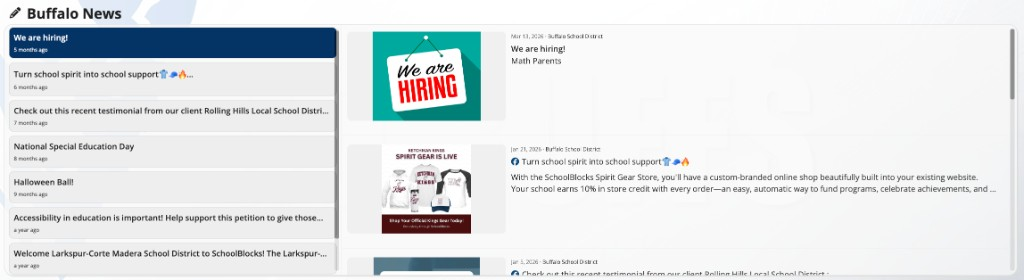
The terrace is a two-pane panel. The left pane lists the headlines with a relative date such as 3 days ago. The right pane holds the posts themselves. Each pane scrolls on its own.
- Desktop: both panes.
- Mobile, and tablets in portrait: the headline pane is not displayed and the posts fill the width.
Clicking a headline in the left pane scrolls the right pane to that post. It does not open the post.
What each post displays
| Element | Behavior |
|---|---|
| Image | The post's image. A post with no image displays none, and its text fills the width |
| Date and page | The post's date and the name of the page it belongs to, in the form Mar 4, 2026 · Lincoln Elementary School. Not displayed on phones |
| Title | One line. A longer title is cut off with an ellipsis |
| Excerpt | Three lines of the post's text, or one line on a post carrying a discussion prompt. Not displayed on phones |
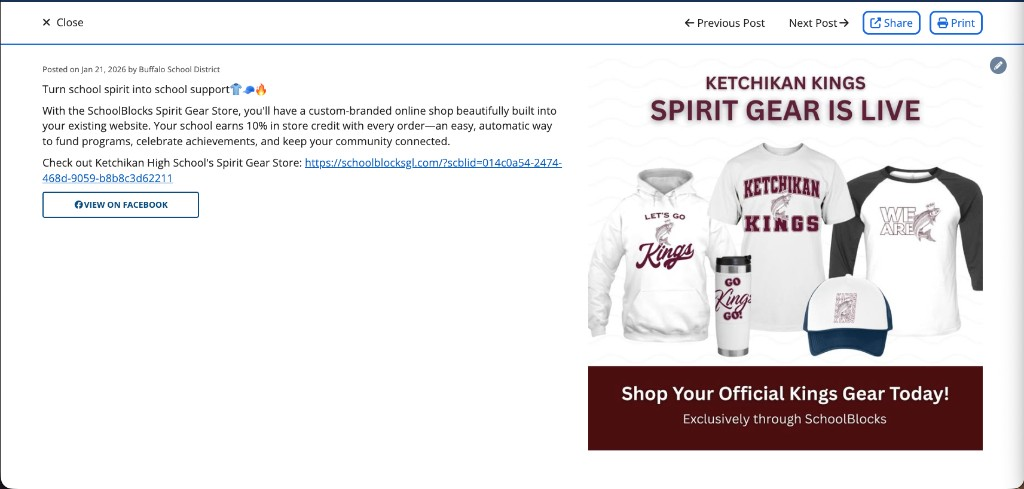
Clicking a post opens it in a window with Close, Share, Print, Previous Post, and Next Post.
Order and quantity
Posts are ordered by date, newest first. There is no pinning or featuring, no order setting, and no date field on a news post. The order follows the date each post was created.
The terrace displays 8 posts. Load More News, at the foot of the posts, adds 8 more each time it is clicked. The control is not displayed when every post has been loaded.
Which posts appear
A post appears in the terrace of the page it was posted to, and of any page it has been shared to. Posts belonging to subpages do not appear on a parent page's terrace, and posts belonging to a parent page do not appear on a subpage's terrace. See Sharing content to other pages.
Editors also see unpublished posts, displayed faded. Visitors do not see them, so an editor's post count is higher than a visitor's.
The page and district tabs
On a school page within a district, and on a subpage, the terrace displays two tabs. The first is named after the current page. The second is named District News, or School News on a site whose top level is a school.
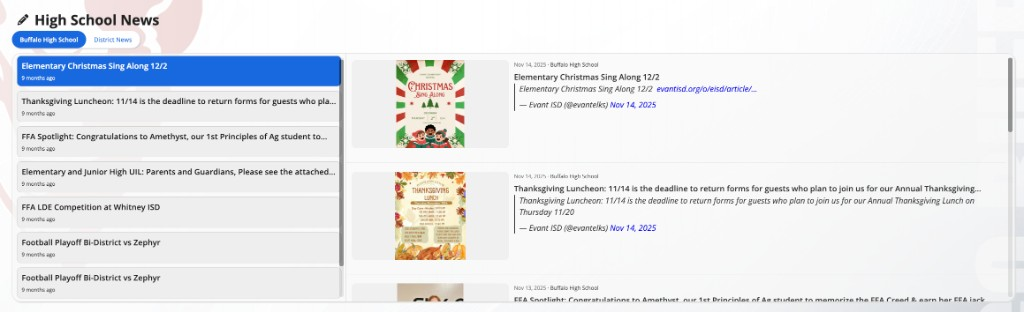
The current page's tab is selected when the page has posts of its own. When the current page has no posts of its own, the terrace opens on the district tab instead. This is decided when the page loads.
While the district tab is selected, the heading is replaced by District News or School News, and Add News Post is not available in the pencil menu.
A district site, and a school site with no parent district, have one set of posts and no tabs.
Turning the terrace on and off
- Click the + (Add content) button in the admin menu.
- Click Terrace Menu.
- Toggle News on.
Toggling the terrace off hides it and retains its heading. Posts are not affected; they belong to the page, not to the terrace. Toggling it on again restores it. The pencil menu on the terrace contains a second control for this, Turn Off News Terrace.
The pencil menu
| Item | Behavior |
|---|---|
| Add News Post | Opens the post editor. Not available while the district tab is selected |
| Move Up and Move Down | Move the terrace. Disabled at the top and bottom of the page |
| Turn Off News Terrace | Hides the terrace |
Heading
The heading is edited in place. Click it, type, and press Enter to save or Escape to cancel.
A terrace whose heading has never been set displays the page's name followed by News, such as Lincoln Elementary School News. A heading saved as an empty field is not displayed to visitors.
Constraints
- One News terrace per page.
- Posts with no image display no placeholder.
- The panel keeps its height when it holds a single short post.
- On phones a post is reduced to its image and a one-line title; the date and the excerpt are not displayed.
- Posts are found by site search whether or not the page has a News terrace.
FAQ
- "Why does our school's News terrace show district news?" The terrace opens on the district tab when the current page has no posts of its own. Add a post to the page, or click the page's own tab.
- "Why is Add News Post missing from the pencil menu?" The district tab is selected. Click the current page's tab and the item returns.
- "Can a post be pinned to the top of the terrace?" No. Posts are ordered newest first by the date they were created, and a news post has no date field to change.
- "Why do posts from our subpages not appear on the parent page?" A post appears only on the page it was posted to and on pages it has been shared to. Add the parent page as a secondary page on the post.
- "Why does one of our posts have no picture?" The post has no image of its own, and a pulled post carries an image only when its source provides one. The terrace displays no placeholder in its place.
- "Why can I see a post that our families say is missing?" It is unpublished. Editors see unpublished posts, faded; visitors do not see them.
- "How many posts does the terrace hold?" It displays 8 at a time and adds 8 more with Load More News, with no overall limit.
Last updated: July 2026.