
About terrace
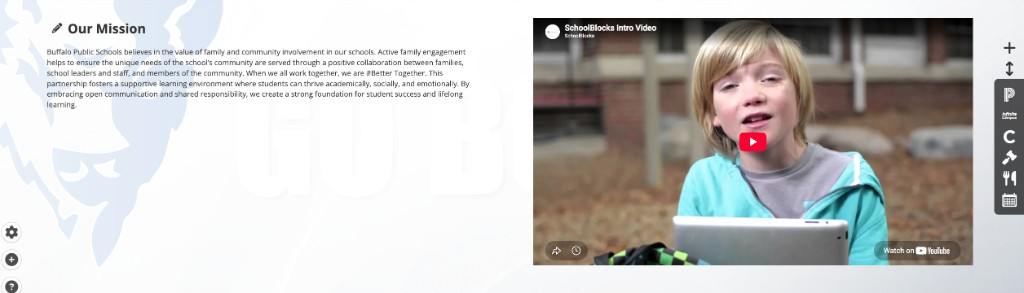
The About terrace is a terrace containing a block of text and an optional image or video beside it.
On desktop, the text and the media sit side by side. On mobile, they stack in a single column. With no media, the text fills the width.
A page contains at most one About terrace.
Turning the terrace on and off
- Click the + (Add content) button in the admin menu.
- Click Terrace Menu.
- Toggle About on.
Toggling the terrace off hides it and retains its heading, text, and media. Toggling it on again restores them. The pencil menu on the terrace contains a second control for this, Turn Off About Terrace.
Opening the editor
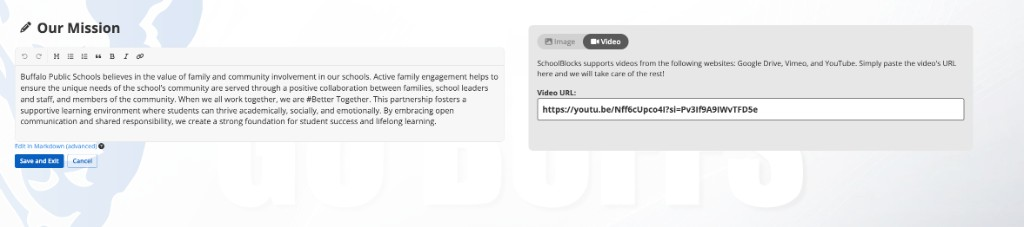
Click the pencil on the terrace and click Edit. The terrace is replaced in place by an editing panel. Save and Exit saves the changes and closes the panel. Cancel discards them.
Save and Exit is disabled while media type is Image and Alt Text is empty.
The pencil menu
| Item | Behavior |
|---|---|
| Edit | Opens the editing panel |
| Move Up and Move Down | Move the terrace. Disabled at the top and bottom of the page |
| Turn Off About Terrace | Hides the terrace |
Heading
The heading is edited in place. Click it, type, and press Enter to save or Escape to cancel. The heading holds 250 characters.
A terrace whose heading has never been set displays the word About. A heading saved as an empty field is not displayed to visitors. Editors continue to see the Add Title placeholder in its position.
Text
The text field is a rich text editor. The toolbar contains undo, redo, heading, bulleted list, numbered list, quote, bold, italic, and link. Edit in Markdown (advanced) replaces the editor with a markdown field.
An editor viewing a terrace with no text sees the placeholder Add some text! Visitors see nothing in that case.
Text entered here is indexed by site search.
Media
Media Type chooses Image or Video.
Image
The editor states: Upload an image to show off your building, your town or shows who you are as an organization. Ideal ratio is 16:9.
Upload Image opens a file picker. Replace Image repeats the process once an image is set. Delete Image removes the image.
JPEG, PNG, WebP, and BMP files are compressed to 2 megabytes during upload. Other formats are not compressed and are refused above 2 megabytes.
Alt Text is displayed once an image is set and is required.
Video
Video URL takes a full web address. The editor states: SchoolBlocks supports videos from the following websites: Google Drive, Vimeo, and YouTube.
A video has no alt text field.
Constraints
- One About terrace per page.
- The terrace can be moved with Move Up and Move Down, but not above the Hero Banner or below the Map.
- Text and media are optional. An About terrace can be saved with both empty.
FAQ
- "Why is Save and Exit disabled?" Media type is Image and Alt Text is empty. Enter alt text, or switch media type to Video, or remove the image.
- "Why do visitors not see Add some text!?" That placeholder is for editors only. Visitors see nothing until text is saved.
- "Can the terrace hold both an image and a video?" No. Media Type chooses one: Image or Video.
- "Why will the image not upload?" JPEG, PNG, WebP, and BMP files are compressed automatically. Other formats are refused above 2 megabytes. Save the file as JPEG or PNG.
Last updated: July 2026.