
Map terrace
The Map terrace is a terrace showing a map of your organization's locations. Clicking a pin opens details for that location.
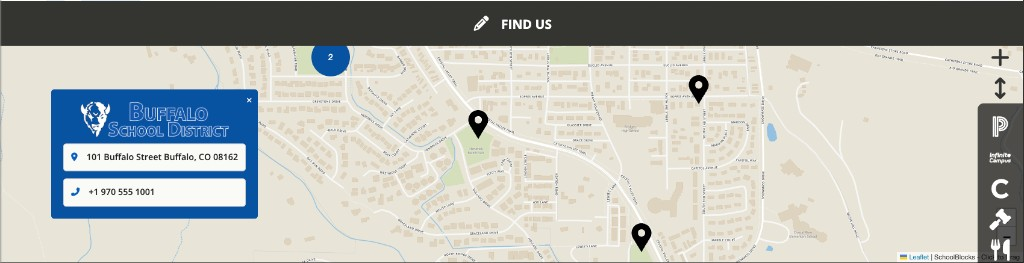
The Map terrace is pinned to the bottom of the page. It cannot be moved with Move Up or Move Down.
A page contains at most one Map terrace.
Turning the terrace on and off
- Click the + (Add content) button in the admin menu.
- Click Terrace Menu.
- Toggle Map on.
The Terrace Menu notes that when the Map is turned on, it is always pinned to the bottom of the page.
Toggling the terrace off hides it and retains its heading. Location pins are not stored on the terrace; they come from each school's location data. The pencil menu on the terrace contains a second control for this, Turn Off Map Terrace.
The pencil menu
| Item | Behavior |
|---|---|
| Turn Off Map Terrace | Hides the terrace |
There is no Edit, Add Location, Move Up, or Move Down item on the Map terrace.
Heading
The heading is edited in place. Click it, type, and press Enter to save or Escape to cancel.
A terrace whose heading has never been set displays FIND US. For editors, an empty heading shows Enter a Title in the heading position.
Where pins come from
Pins are the locations of schools and other pages under the site. On a district page, the map includes locations from descendant pages that have address data.
There is no location editor on the terrace itself. Address, phone, and related fields are edited on each organization's own contact information.
A school with no address data has no pin.
Layout and visitor behavior
The map area is a fixed height. Pins can cluster when several locations sit close together.
Clicking a pin opens a card with that location's details. An × control labelled Close Map Insert closes the card.
- Desktop: the location card sits over the map toward the left.
- Mobile: the location card is centered over the map.
Constraints
- One Map terrace per page.
- The Map terrace stays at the bottom of the page. It has no Move Up or Move Down.
- Locations are not added or removed from the terrace pencil menu.
FAQ
- "Why can I not move the Map terrace?" The Map terrace is pinned to the bottom of the page. Only Turn Off Map Terrace appears in its pencil menu.
- "Why can I not add a school from the Map pencil menu?" Locations are not edited on the terrace. Edit each school's contact information. Schools with address data appear as pins on ancestor maps.
- "Why is a school missing from our district map?" That school has no location address data, or it is not under this site in the organization tree.
- "Why does the heading say FIND US?" That is the default heading for a Map terrace that has never been customized. Edit the heading in place to change it.
Last updated: July 2026.