
Spirit Gear terrace
The Spirit Gear terrace is a terrace showing products from your school store, with a link to the full store.
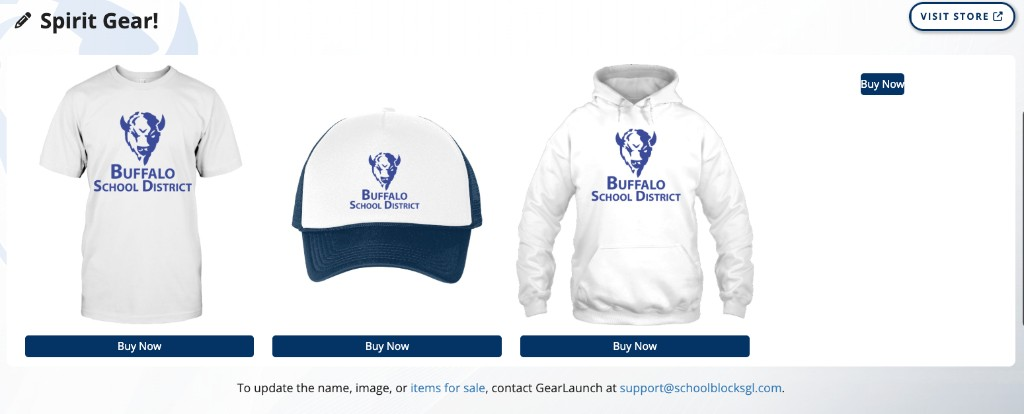
A page contains at most one Spirit Gear terrace.
Product names, images, and items for sale are managed by GearLaunch, not in the terrace editor.
Turning the terrace on and off
- Click the + (Add content) button in the admin menu.
- Click Terrace Menu.
- Toggle Spirit Gear on.
Turning the terrace on for the first time starts store creation for that page. Toggling the terrace off hides it and retains its heading. Products live in the store service, not on the terrace row. The pencil menu on the terrace contains a second control for this, Turn Off Spirit Gear Terrace.
The pencil menu
| Item | Behavior |
|---|---|
| Move Up and Move Down | Move the terrace. Disabled at the top and bottom of the page |
| Turn Off Spirit Gear Terrace | Hides the terrace |
There is no product editor in the pencil menu.
Heading
The heading is edited in place. Click it, type, and press Enter to save or Escape to cancel. The heading holds 250 characters.
A terrace whose heading has never been set displays Spirit Gear. A heading saved as an empty field is not displayed to visitors. Editors continue to see the Add Title placeholder in its position.
While the store is being created
Editors see: Your store is being created! All products will be branded with '{page title}'. and Please refresh the page to see your custom items.
Visitors do not see that message. While creation is in progress, visitors see no Spirit Gear terrace content. Refresh the page after creation finishes to load products.
Layout and visitor behavior
Product tiles display in a grid. The terrace shows up to four products on a wide desktop window, fewer on narrower windows, and one product on a narrow phone. Extra products remain in the full store.
Each product shows a Buy Now link to that item in the store.
Visit Store opens the full storefront in a new context. On mobile, Visit Store also appears below the product grid.
Updating products
Editors see a notice under the products: To update the name, image, or items for sale, contact GearLaunch at support@schoolblocksgl.com.
The email address opens a message with the page title and site title filled in. There is no in-app form to change products, the store name, or the store image.
Error state
If the store fails to load, the terrace displays a message that there was an issue loading this store.
Constraints
- One Spirit Gear terrace per page.
- The terrace can be moved with Move Up and Move Down, but not above the Hero Banner or below the Map.
- Product edits go through GearLaunch at support@schoolblocksgl.com, not through SchoolBlocks page settings.
FAQ
- "Why do only four products show on our home page?" The terrace displays a short grid. Open Visit Store for the full catalogue.
- "How do we change a product photo or price?" Contact GearLaunch at support@schoolblocksgl.com. The terrace has no product editor.
- "Our terrace says the store is being created. Is it broken?" Store creation runs after the terrace is first turned on. Editors see that message; visitors see no products until creation finishes. Refresh the page when it finishes.
- "Can a page have two Spirit Gear terraces?" No. A page holds one terrace of each type.
Last updated: July 2026.