
Gallery terrace
The Gallery terrace is a terrace displaying photos and videos for the page in a tiled grid.
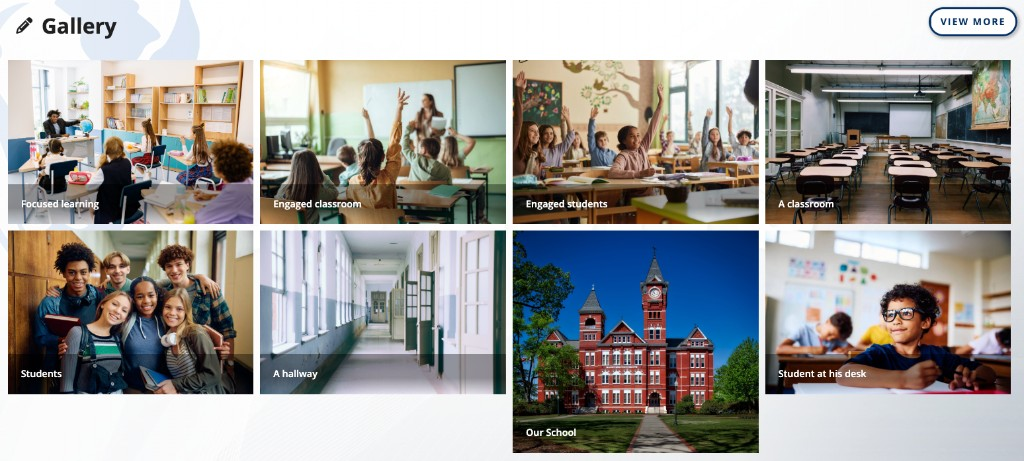
This article covers the terrace. For Facebook as a media source, refresh timing, and what counts as gallery media, see Gallery and media.
Media items belong to the page, not to the terrace row. Toggling the terrace off hides the display only.
A page contains at most one Gallery terrace.
Turning the terrace on and off
- Click the + (Add content) button in the admin menu.
- Click Terrace Menu.
- Toggle Gallery on.
Toggling the terrace off hides it and retains its heading. Photos and videos are unchanged. The pencil menu on the terrace contains a second control for this, Turn Off Gallery Terrace.
The pencil menu
| Item | Behavior |
|---|---|
| Add Image | Opens the media editor to upload a photo |
| Move Up and Move Down | Move the terrace. Disabled at the top and bottom of the page |
| Turn Off Gallery Terrace | Hides the terrace |
Heading
The heading is edited in place. Click it, type, and press Enter to save or Escape to cancel. The heading holds 250 characters.
A terrace whose heading has never been set displays the word Gallery. A heading saved as an empty field is not displayed to visitors. Editors continue to see the Add Title placeholder in its position.
Layout
- Desktop: a four-column tiled grid.
- Mobile: a two-column grid. The terrace shows the first four items on phones.
The terrace displays up to eight items. When more items exist, View More links to the full gallery page for this organization.
Clicking an item opens it in a window with previous and next controls across the gallery list.
Only photos and videos appear. A Facebook text post is a news item and belongs in the News terrace, not the Gallery. YouTube and Vimeo are not Gallery sources. See Gallery and media.
Adding an image
Click the pencil on the terrace and click Add Image.
| Field | Behavior |
|---|---|
| Title | Required when editing a saved custom item. Placeholder: Add a Title (required) |
| Image | File picker. Accepts JPEG, JPG, PNG, and GIF at the picker. JPEG, PNG, WebP, and BMP are compressed to 2 megabytes. There is no crop step |
| Alt Text | Required once an image is set. Placeholder: Image Alt Text (required) |
| Text | Optional markdown. Placeholder: What would you like to say? |
Post creates a new item. Save updates an existing one. Delete removes an existing custom item.
A connected Facebook page also supplies photos and videos. See Gallery and media.
Constraints
- One Gallery terrace per page.
- The terrace shows eight items; phones show four in the terrace itself.
- The terrace can be moved with Move Up and Move Down, but not above the Hero Banner or below the Map.
FAQ
- "Why do only four pictures show on phones?" On phones the Gallery terrace shows the first four items. Open View More for the full gallery page, or view the page on desktop for eight in the terrace.
- "Why is a Facebook album incomplete?" Allow up to an hour, or use Refresh Feed on the source. See Gallery and media.
- "Can I add a YouTube video to the Gallery?" No. Gallery videos come from a connected Facebook page or from items the platform treats as media. Use the About terrace for a YouTube or Vimeo URL.
- "How do I add our own pictures?" Click the pencil on the terrace and click Add Image.
Last updated: July 2026.